
Last updated on
Oct 31, 2026

VT AGO-VT 690-5 2000-2026 free printable template
pdfFiller is not affiliated with any government organization

Fill out
Complete the form online in a simple drag-and-drop editor.

eSign
Add your legally binding signature or send the form for signing.

Share
Share the form via a link, letting anyone fill it out from any device.

Export
Download, print, email, or move the form to your cloud storage.
Why pdfFiller is the best tool for your documents and forms


End-to-end document management
From editing and signing to collaboration and tracking, pdfFiller has everything you need to get your documents done quickly and efficiently.
Accessible from anywhere
pdfFiller is fully cloud-based. This means you can edit, sign, and share documents from anywhere using your computer, smartphone, or tablet.
Secure and compliant
pdfFiller lets you securely manage documents following global laws like ESIGN, CCPA, and GDPR. It's also HIPAA and SOC 2 compliant.
What is VT AGO-VT 690-5
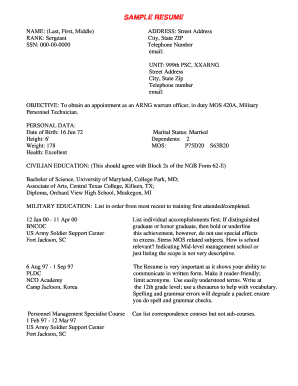
The Military Experience & Education Resume is a supplemental document used by individuals to document their military experience and education for government employment purposes.
pdfFiller scores top ratings on review platforms




Who needs VT AGO-VT 690-5?
Explore how professionals across industries use pdfFiller.

VT AGO-VT 690-5 is needed by:
-
Veterans applying for government jobs
-
Active duty military personnel transitioning to civilian roles
-
Graduates seeking to leverage military education
-
Job seekers interested in government positions
-
Civilian employers reviewing military qualifications
Comprehensive Guide to VT AGO-VT 690-5
What is the Military Experience & Education Resume?
The Military Experience & Education Resume serves as a supplement to the OF-612 application, specifically designed to document military experience and education for U.S. government employment. This form is essential for individuals transitioning from military to civilian employment, as it clearly outlines relevant skills and qualifications. Key components required in the form include personal information, a detailed history of military service, and educational background, ensuring applicants present a comprehensive view of their qualifications.
Purpose and Benefits of the Military Experience & Education Resume
This form plays a significant role in accurately documenting military service for government job applications. By employing a structured resume format, applicants can present their qualifications in a clear and organized manner, which enhances the overall effectiveness of their application. Emphasizing military experience not only supports the eligibility of applicants but also aligns their unique skills with the needs of U.S. government jobs.
Who Needs the Military Experience & Education Resume?
The Military Experience & Education Resume is primarily designed for veterans and active-duty military members who are transitioning to civilian jobs. Government job seekers can greatly benefit from this form, as it effectively showcases their military-related skills. Common fields that applicants may possess include logistics, administration, and technical roles, all of which are highly sought after in civilian positions.
How to Fill Out the Military Experience & Education Resume Online (Step-by-Step)
To complete the Military Experience & Education Resume online using pdfFiller, follow these step-by-step instructions:
-
Access the pdfFiller platform and locate the Military Experience & Education Resume template.
-
Begin by entering your personal information in the designated fields.
-
Detail your military experience, including service dates and roles held.
-
Provide information pertaining to your education, listing institutions and courses completed.
-
Review all entries to ensure accuracy before finalizing your submission.
Field-by-Field Instructions for the Military Experience & Education Resume
Each section of the Military Experience & Education Resume requires specific information:
-
Personal Information: Include your full name, contact details, and Social Security number.
-
Military Service History: Document service branch, rank, and duty assignments with dates.
-
Education: List schools attended, degrees earned, and any relevant certifications.
Common mistakes to avoid include omitting key details and misrepresenting service dates. Ensure all information is accurate and reflects your qualifications.
Common Errors and How to Avoid Them
While filling out the Military Experience & Education Resume, applicants often encounter pitfalls such as:
-
Incomplete personal information or military history.
-
Entering incorrect education details or misrepresenting qualifications.
-
Failing to review the form before submission.
To ensure accuracy, double-check all entries and confirm that the document is complete prior to submission.
Digital Signature vs. Wet Signature Requirements
Signing the Military Experience & Education Resume can be accomplished via digital or wet signatures. Digital signatures are legally recognized and can be easily completed using pdfFiller, providing convenience and security. In contrast, traditional wet signatures require printing the form, signing it manually, and may involve additional mailing steps. Understanding these options is crucial for compliant submission.
Where and How to Submit the Military Experience & Education Resume
Once you have completed the Military Experience & Education Resume, it is essential to know where to submit it. You can typically submit the form electronically through designated government portals or mail it directly to the appropriate agency. Be sure to check for any follow-up actions required, such as tracking your submission or requesting confirmation of receipt.
Security and Compliance in Handling Your Military Experience & Education Resume
At pdfFiller, we prioritize the security of your sensitive data. Our platform employs 256-bit encryption and is compliant with SOC 2 Type II, HIPAA, and GDPR regulations. Protecting your personal information is crucial, especially when filling out government forms. Users can trust that their data remains confidential and secure throughout the process.
Enhance Your Submission Experience with pdfFiller
Utilizing pdfFiller to complete your Military Experience & Education Resume offers numerous advantages. Our cloud-based platform streamlines the form-filling process, allowing for easy editing and eSigning from any device without the need for downloads. Experience the efficiency and convenience that pdfFiller provides and start completing your resume online today.
How to fill out the VT AGO-VT 690-5
-
1.Access pdfFiller and search for the Military Experience & Education Resume template.
-
2.Open the form to view the fillable fields and instructions provided in the template.
-
3.Before starting, gather necessary information such as your personal details, military service history, and educational background.
-
4.Begin by entering your personal information in the designated fields, ensuring accuracy and completeness.
-
5.Proceed to document your military service history, including branch, rank, and any special training completed.
-
6.Next, fill in your educational qualifications, listing courses, degrees, or certifications received during your military service.
-
7.Use the checkboxes provided to indicate your relevant skills or experiences related to the position you are applying for.
-
8.Once all fields are completed, review the form for accuracy, ensuring all required information is present.
-
9.Don't forget to sign the form where indicated, providing your name, date, and signature.
-
10.Save your completed document by selecting the 'Save' option, ensuring you choose a recognizable file name.
-
11.Download the form if you need an offline copy, or submit directly through pdfFiller following the submission guidelines provided.

Who is eligible to use the Military Experience & Education Resume?
This form is designed for veterans, active duty military personnel, and anyone with military training or experience applying for government jobs.
Is there a deadline for submitting the Military Experience & Education Resume?
Deadlines vary by job application; it's best to check the specific job posting for submission timelines to ensure your form is submitted on time.
How can I submit the completed Military Experience & Education Resume?
Completed resumes can be submitted electronically through the job application portal or printed and submitted by mail, depending on employer preferences.
What supporting documents do I need to submit with the form?
Typically, you'll need to attach your DD214, transcripts, or other military records to support your application alongside this resume.
What are common mistakes to avoid when filling out this form?
Common mistakes include leaving fields blank, providing inaccurate dates, and failing to sign the form. Always double-check entries for accuracy.
How long does it take to process the Military Experience & Education Resume?
Processing time can vary based on the employer; it's advisable to follow up if you haven't received a response after a few weeks.
Can this form be used for non-government jobs?
While primarily designed for government jobs, the Military Experience & Education Resume can also be adapted for civilian job applications requiring similar information.
Related Content
Related Forms




Related Catalogs
Get the latest insights from our blog


If you believe that this page should be taken down, please follow our DMCA take down process
here
.
This form may include fields for payment information. Data entered in these fields is not covered by PCI DSS compliance.